Azure Reference Architecture for AVD Printing
By Charles Ian Pritchard on March 4, 2020
Last updated on March 31, 2026
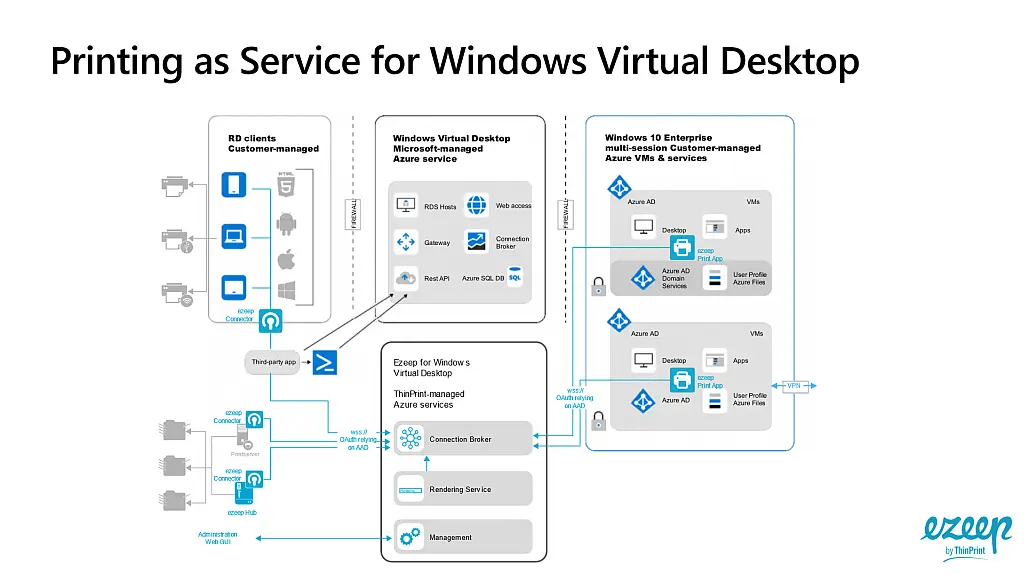
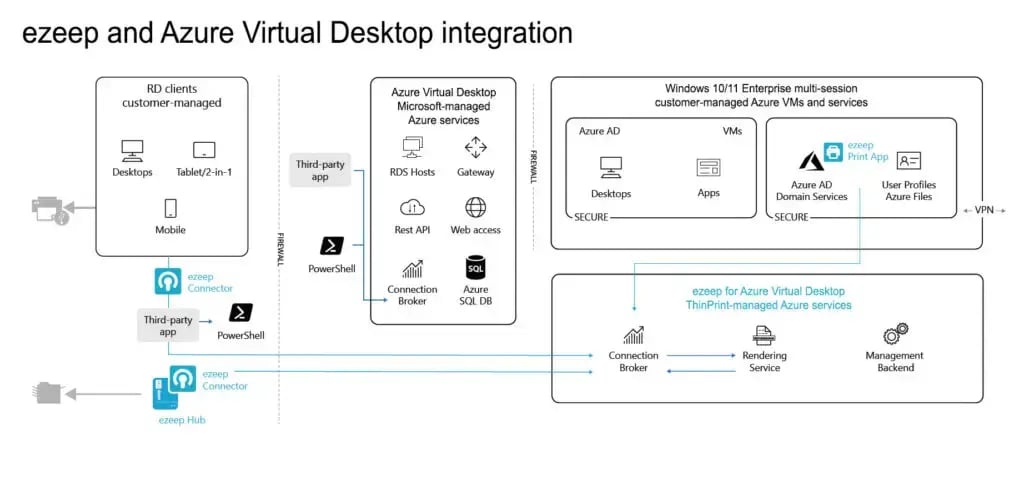
Setting up printing in Azure Virtual Desktop (AVD) can be complex, but a solid reference architecture simplifies the process. This guide unpacks the essentials for designing a reliable, cost-effective print architecture for AVD. We'll explore how to handle secure, stable connections from Azure-hosted applications to on-premises printers, drawing on extensive experience and collaboration with Microsoft in AVD print integration.
What is a good reference architecture for AVD printing?
A good reference architecture provides a foundational blueprint that details best practices and outlines the connections between essential components. For AVD printing, it ensures a structured approach to setting up a printing infrastructure that addresses the challenges of virtualized environments and global printing demands.
This architecture is built on printing expertise and a long-term collaboration with Microsoft to create an integration solution for AVD. It helps you understand the requirements for a budget-friendly and dependable print environment in Azure Virtual Desktop.

How can ezeep help with Azure Virtual Desktop printing?
Discover how ezeep helps your enterprise with Azure Virtual Desktop printing.
A well-defined Azure reference architecture for AVD printing helps IT teams ensure consistent, reliable printing experiences for users. This reduces support tickets and improves productivity across your organization. ezeep is built on ThinPrint technology, trusted by Fortune 500 organizations, processing millions of pages daily. Explore how ezeep makes printing easy in virtual environments.
Frequently Asked Questions
What is an Azure reference architecture for AVD printing?
An Azure reference architecture for AVD printing is a template that outlines best practices for setting up printing within an Azure Virtual Desktop environment. It details the relationships between components to ensure secure and stable connections from Azure-hosted applications to printers, both in the cloud and on-premises.
Why is a new framework for modern printing infrastructure needed with Azure Virtual Desktop?
A new framework for modern printing infrastructure is needed because Azure Virtual Desktop (AVD) introduces challenges in establishing secure, stable connections from Azure-hosted applications to on-premises printers. AVD provides a rich virtualized desktop experience, but global printing demands require a new approach to make it work effectively for organizations and users.
What challenges does Azure Virtual Desktop present for printing?
Azure Virtual Desktop presents challenges in securely and reliably connecting Azure-hosted applications to physical printers, especially those located on-premises. The shift to a virtualized environment requires a new approach to manage printing infrastructure effectively.
How does ezeep help with Azure Virtual Desktop printing?
ezeep helps with Azure Virtual Desktop printing by providing a cloud-based solution that simplifies the connection between Azure-hosted applications and printers. This helps to overcome the complexities of establishing secure and stable print connections in a virtualized environment.
The static part of the sidebar, it will scroll with the page. These are drag and drop areas, so please remove any unnecessary space from your sections and add modules in a single column.
You May Also Like
These Related Stories

Managing Printers in Azure Virtual Desktop

Printing From Azure Virtual Desktop (AVD) on Apple Devices