By Clara Salomon on February 25, 2022
Last updated on March 31, 2026

Integrating printing into JavaScript web applications can be a challenge. With traditional desktop applications giving way to cloud-based web apps, users frequently need to print documents like PDFs from many devices. This often requires complex workarounds for developers.
ezeep offers a solution to this. Our JavaScript library simplifies adding printing capabilities to any JavaScript or Angular-based application. Developers can integrate printing with minimal steps, letting users output PDFs directly from their web apps.
How the ezeep JavaScript Library Was Developed
ezeep provides cloud-based printing for businesses and individual users. Most web applications today are built with JavaScript or TypeScript. Web developers seeking to add print functions often use the ezeep API. However, we also wanted to offer a ready-made library for direct import, allowing users to print PDFs instantly. This led to the creation of ezeep.js.
Why Print PDFs From JavaScript Apps is Difficult and How ezeep.js Helps
Web application developers can save significant time by using the ezeep JavaScript library from our GitHub page. This removes the need to implement print dialogs or manage logins separately, tasks typically required when using a direct API.
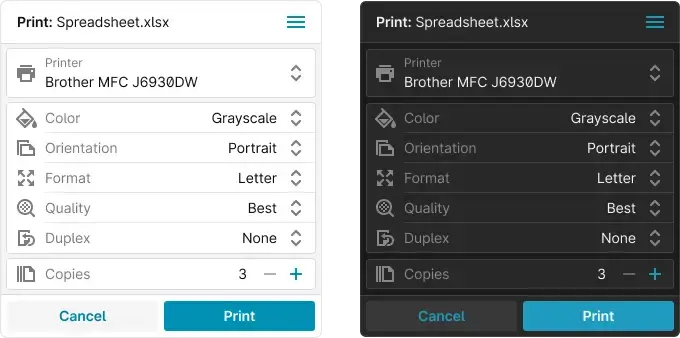
With ezeep.js, login management is straightforward, and the system remembers login details when requested. This means developers do not need to concern themselves with user authentication flows or session durations. Updates also become simpler because they are added more or less automatically to the web app.
How to Use the JavaScript Print API and Find More Information
All necessary information to get started is available on our GitHub page. To use ezeep.js, you need an ezeep account, which you can create for free. After contacting the ezeep team for your client ID, download the ezeep Connector. The GitHub instructions guide you through the setup. The project is open source, encouraging contributions for improvements or extensions.
Who Benefits from ezeep.js?
The two main functions of ezeep.js cover most printing needs for documents or PDFs from JavaScript applications. Many workflows, such as those in logistics apps, generate documents in the backend that require printing without being downloaded. This is also true for web applications handling sensitive information where users should not download files.
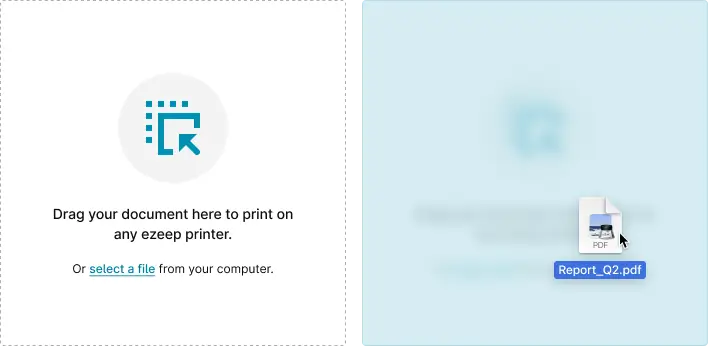
ezeep.js handles these situations efficiently. Once a document is created in the application, a URL is generated and sent directly to ezeep for printing. For cases where users have saved a document and want to print it from within the application, the drag-and-drop field makes this simple. The print dialog also allows users to select preferred printer properties and the number of copies.
Start your JavaScript Print API project

Protect Print Workflows: Avoid Local PDF Storage

How to Print to Remote Printers without VPN