By Charles Ian Pritchard on May 31, 2023
Last updated on March 31, 2026
Printing to remote printers can be a major source of frustration in today's work environment, especially when VPN connections are involved. The good news is that cloud printing offers a practical way to simplify this process.
Many organizations rely on VPNs for remote access. This routes all traffic, including print jobs, through a VPN tunnel, making remote network resources like printers accessible. However, this often complicates printing for both users and IT administrators.
ezeep provides a straightforward solution for printing to remote printers without the need for a VPN. It allows users to access printers on remote networks easily, simplifying the printing process from any location.
Why Printing with a VPN Can Be Problematic
When working remotely, many organizations depend on VPNs to grant access to internal network resources. While VPNs secure network connections, they add layers of complexity to printing. Every print job must travel through the VPN tunnel, which can be slow and unreliable.
Users often face connection drops or delays, which frustrates their attempts to print. For IT teams, managing printer drivers and configurations across various VPN connections adds significant overhead. This setup also requires constant maintenance and troubleshooting, creating a less than ideal user experience.
How ezeep Allows You to Print to Remote Printers Without a VPN
Printing to remote printers without a VPN using ezeep is simple. After signing up, download and install the ezeep Connector on the server or PC where your printers are located. The ezeep Hub also simplifies this for remote workers; it connects to their network and automatically adds all found printers to your ezeep account.
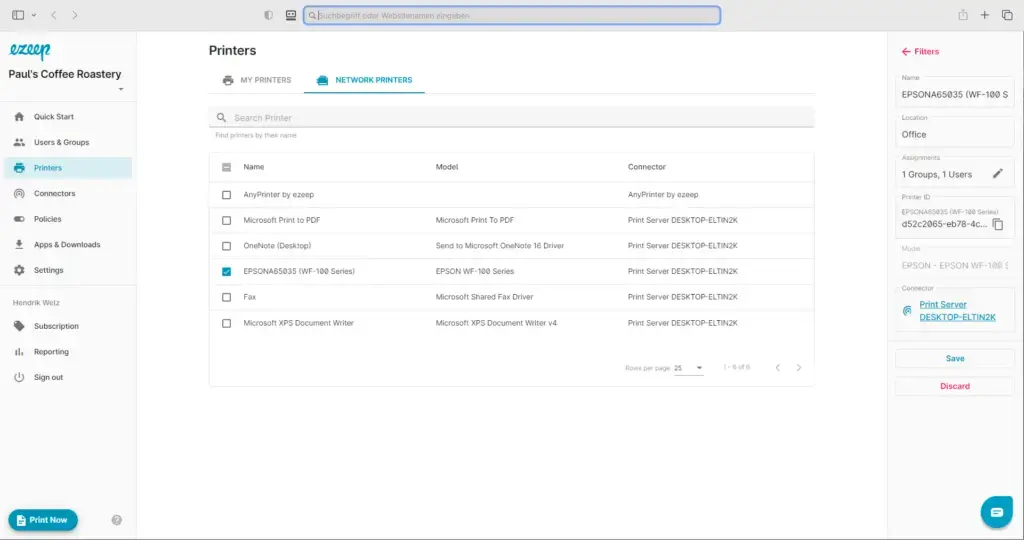
Next, configure the printer for remote use. Log into the ezeep web portal, select the desired printer, and then assign it to specific users or groups. With this setup, users can print from any internet-connected device.
The ezeep Print apps are available for iOS, Android, Windows, Mac, and Chrome. When a document is printed, it is sent to the printer remotely, eliminating any need for a VPN. Printing with ezeep ensures data protection, with all client-server communication encrypted. Documents are only processed for printing and are deleted immediately after completion, never stored.
Customer Success: Printing Without VPN with ezeep
Patrick Simon, an IT specialist based in Austria, needed a mobile printing solution after Google Cloud Print was discontinued. He found that while VPN printing was possible, it required activating the VPN for each print job. "With ezeep, this has been simplified significantly and every document can be sent to the printer immediately. This simplifies the work immensely."
Marcus Klein, CIO at QCS Quick Cargo Service, sought a way to print from his home office without connecting to the company network. Thanks to ezeep, he can now print easily from home and use third-party printers in the company network without an inconvenient VPN. "Thanks to ezeep, I can connect printers outside the network quickly and easily."
Print to Remote Printers Without VPN
Remote printing is a core part of modern work, but VPNs can complicate it. ezeep offers a solution that makes remote printing simple and convenient. With the steps outlined, you can set up remote printing with ezeep quickly.

Printer Sharing: Cloud Printing Saves You Time
Printing Over VPN: It Can Be Done