
By Charles Ian Pritchard on Jun 8, 2022 2:00:00 AM
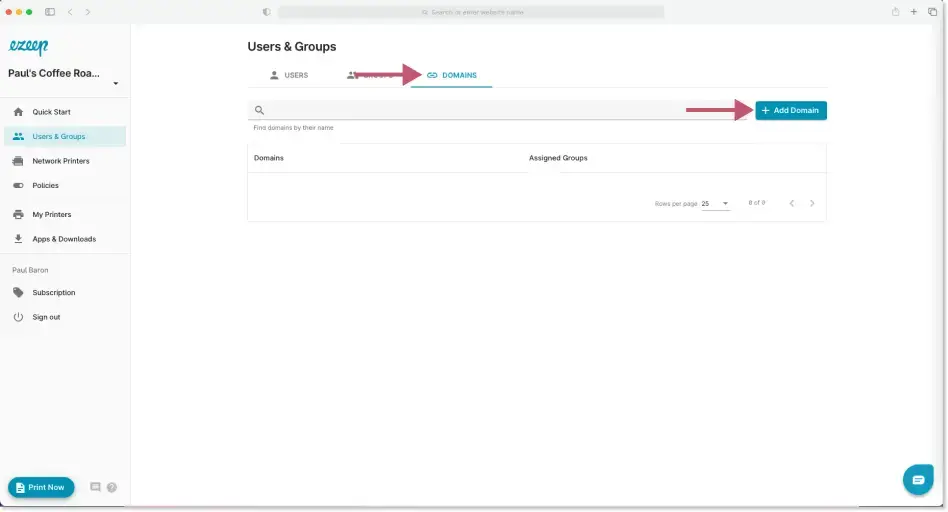
We are speeding up the management of new users in the ezeep Admin Portal. With this new feature, it is now possible to assign users to new groups automatically based on their mail domain.
The feature will save time for administrators.
To start, go to Users and Groups, where a new option called “Domains” is now available. Clicking on this view displays all the existing domains you have created and which groups they are associated with. New automations can be created by clicking on the “Add Domain” button in the top right.
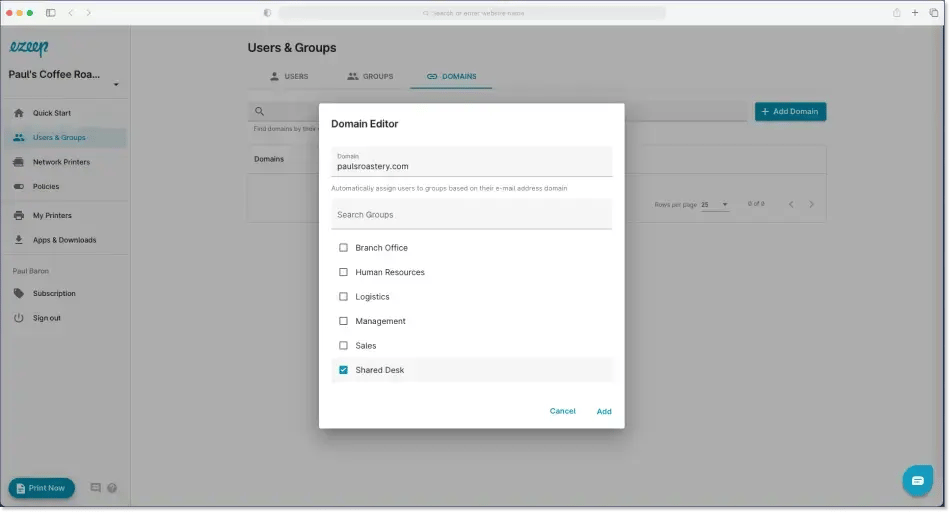
Here's an example: I want all new ezeep users at Paul's Coffee Roastery to be automatically assigned to the “Shared Desk” group. To do this, I click on Add Domain to open the Domain Editor. Here I can input the domain "paulsroastery.com" and select the "Shared Desk" group. Any new users I now add whose email ends in paulsroastery.com will land in the Shared Desk group by default and can immediately print to the printers in this group. This helps you get users printing faster and reduces the time spent managing and creating groups.
Now Available in the ezeep Admin Portal
Already an ezeep user? This new feature is now available in the ezeep Admin Portal, so feel free to start tweaking your workflows.
Not using ezeep already? Then find out more information about our free trial on our website: Try for Free.
No Comments Yet
Let us know what you think