Our new Print Later feature has now been released. This feature, available in the Pro, Business, and Enterprise plans, allows you to print documents, whether from the desktop or in a remote desktop session, and pick them up later at your printer using the ezeep Printer app for iOS & Android. This feature does not require any QR scan or further authentication.
How It Works for Users
To use Print Later, you need the ezeep printer app for iOS or Android.
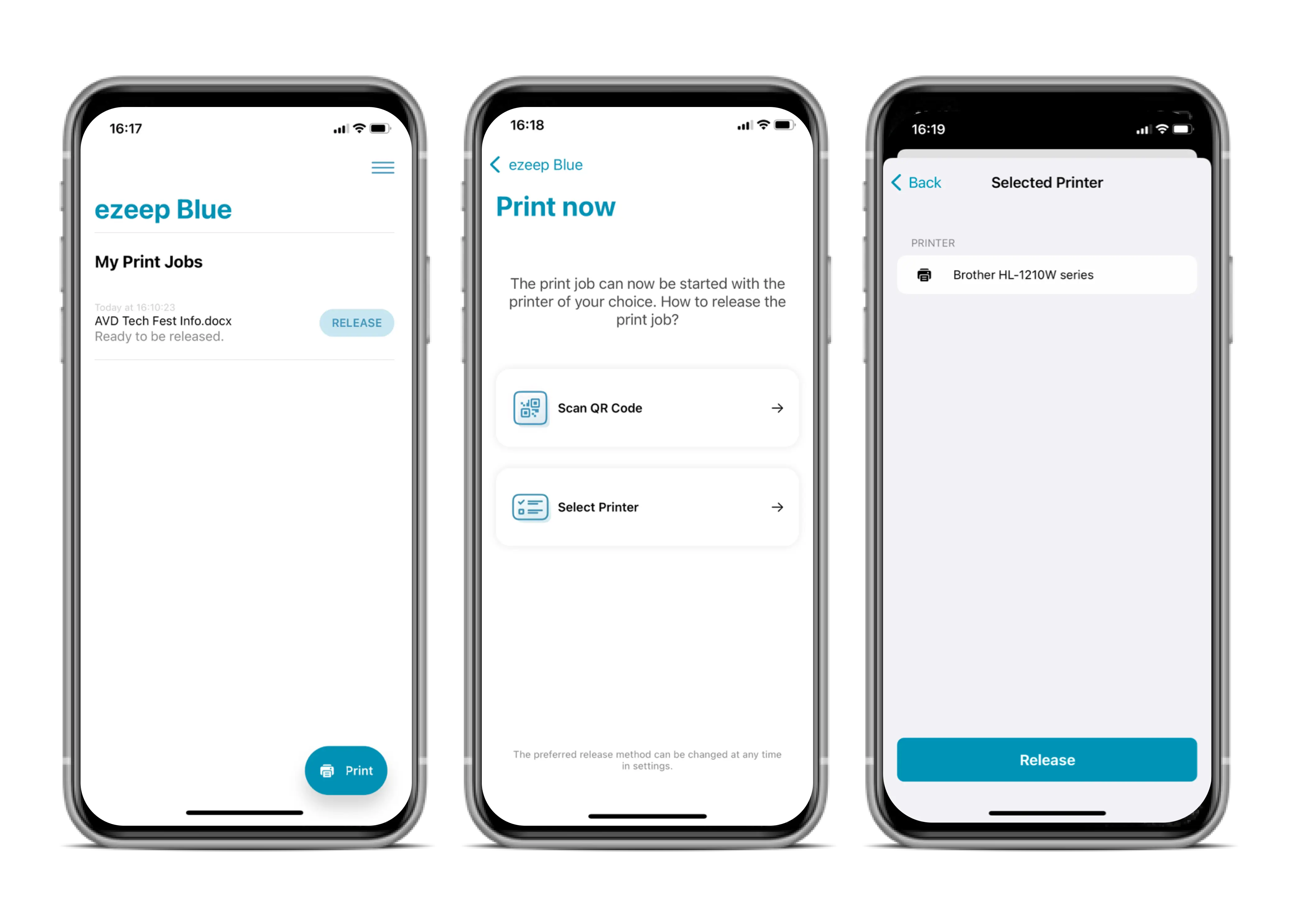
Print your document as usual on your desktop, from the app, or within a remote desktop session. When printing, select AnyPrinter by ezeep as the printer. This will put the print job in the queue.
When you are ready to print, open the ezeep Printer App on your mobile device. The print job will appear directly. By clicking on Release, you can select the desired printer to start the printing process.
Setup for Admins
In Policies in the ezeep Admin Portal, administrators can deactivate or activate Print Later. Once activated, you can assign the AnyPrinter by ezeep printer queue to the desired users via Users & Groups. After that, Print Later is enabled for these users.
Now Available in the ezeep Admin Portal
You already use ezeep? Great! This new feature is now available for all Pro, Business, and Enterprise customers. Free Plan users can upgrade their plan at any time in the Subscription Menu to use Print Later.
Not using ezeep yet? Then check out our website: Start now.

No Comments Yet
Let us know what you think