Printing From Azure Virtual Desktop (AVD) on Apple Devices
By Carsten Mickeleit on January 30, 2020
Last updated on March 31, 2026

Working with Azure Virtual Desktop (AVD) on Mac, iPhone, and iPad can include full printer support without clunky printing procedures. While Apple users might prefer their ecosystem, AVD on a Mac provides attractive and useful functionality. However, printing to network or local printers from a virtualized Windows desktop on Apple devices often needs optimization.
Often, direct printing to network printers is not possible, and support for locally connected printers is either impossible or depends on redirecting print jobs to a virtual printer that creates a PDF for download. This is partly because iPad and iPhone printing uses AirPrint.
How to Launch Azure Virtual Desktop on Mac & Apple Devices
Users can quickly launch an Azure Virtual Desktop session on Mac and iPad via the HTML5 client. They simply open the remote desktop web client in their web browser (using Microsoft Edge is recommended on macOS). After logging in to Microsoft Entra ID, the desktop appears. For extended use, the Microsoft Remote Desktop App is available for iPhone, iPadOS, and macOS, offering "non-windowed" AVD access.
Printing From Azure Virtual Desktop with Apple Devices
The standard print support on AVD varies significantly depending on how the session is accessed. Default solutions are often limited, requiring users to navigate complex options based on their access method. This can lead to increased support requests.
| Default Printing | Printing with ezeep | |
|---|---|---|
| HTML5 MacOS | Convert and download document into PDF, open and print | Direct printing to all network and local printers |
| HTML5 iPadOS | Convert and download document into PDF, open and print via AirPrint | Direct printing to all network printers |
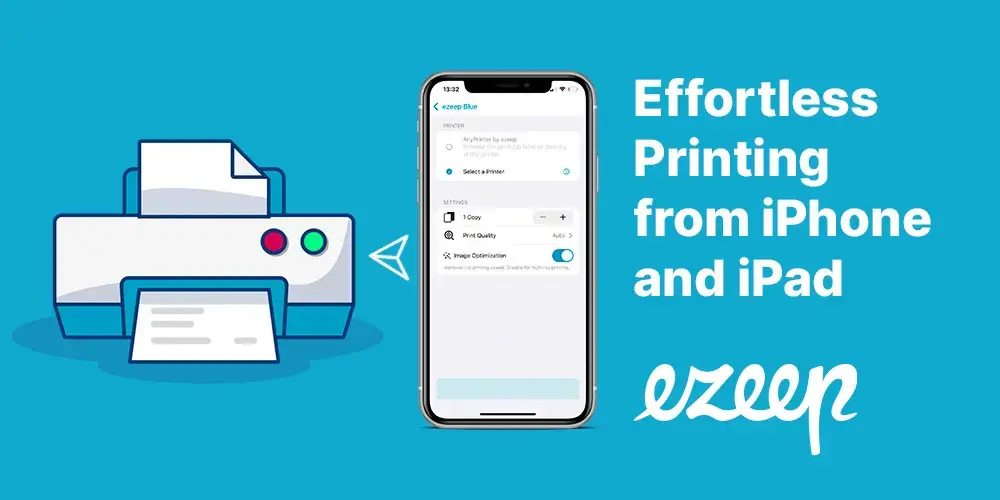
| iPhone App | Not supported | Direct printing to all network printers |
| iPadOS App | Not supported | Direct printing to all network printers |
| MacOS App | Direct printing to all local printers | Direct and faster printing to all local and network printers |
| When printing slightly more complex documents, ezeep is about 6x faster and the format accuracy is higher too | ||
Why Use a Cloud Printing Provider for AVD?
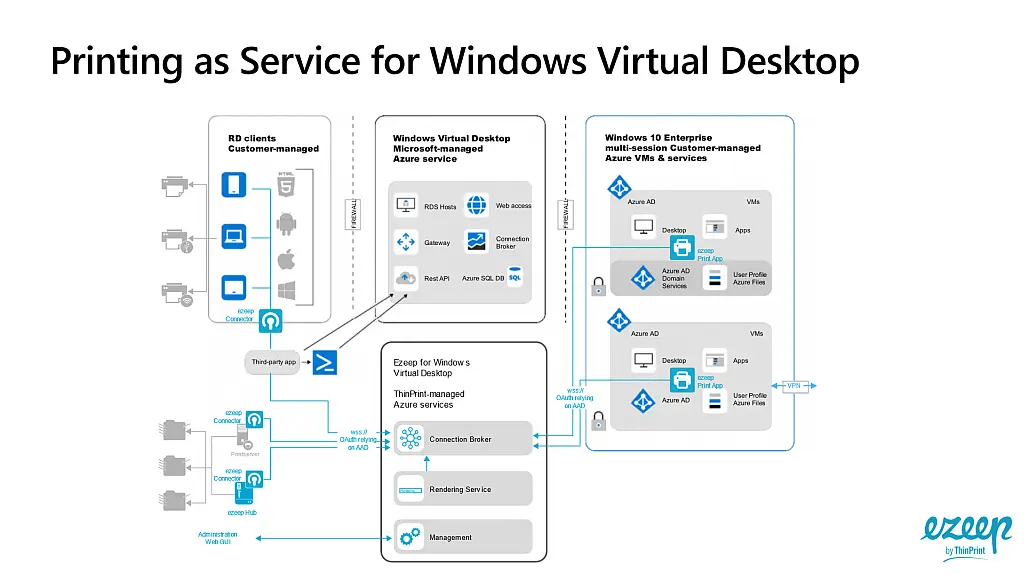
A cloud printing provider like ezeep connects directly to Azure Virtual Desktop in the cloud. It manages network printers via its own protocol and addresses locally connected printers using the connector on macOS. This approach optimizes data transmission for volume and speed.
ezeep users can print, on average, six times faster. For standard corporate environments, relying on ezeep's support for network printers is recommended. Network printers can be distributed globally across different locations without needing a VPN. When working remotely or in a home office, printing to local printers is possible through the ezeep macOS connector.
Advantages of ezeep for AVD Printing
Beyond enabling basic printing from AVD on Mac to local printers, ezeep for macOS offers several benefits:
- Very fast spooling, relieving the AVD of the print job within seconds.
- The printing process continues even if the session ends or the MacBook closes.
- Unified printing for both HTML5 client and the macOS Remote Desktop App.
- High print speed and streaming means printers start jobs almost immediately, leading to high user satisfaction and preventing duplicate print jobs.
With ezeep for macOS, iPadOS, and iOS, you get simple, fast AVD printing. This reduces support costs and increases user satisfaction.
Frequently Asked Questions
Can I print directly to network printers from Azure Virtual Desktop on a Mac?
No, direct printing to network printers from Azure Virtual Desktop on Mac is not generally possible. The virtualized Windows environment on Apple devices has limitations regarding direct network printer support.
How does printing to local printers work with Azure Virtual Desktop on Apple devices?
Printing to local printers from Azure Virtual Desktop on Apple devices is often not directly supported or requires redirection to a virtual printer. This process typically creates a PDF of the document for download, which can be an inconvenient workaround.
Does ezeep enable full printer support for Azure Virtual Desktop on Mac, iPhone, and iPad?
Yes, ezeep provides full printer support for Azure Virtual Desktop users on Mac, iPhone, and iPad. This eliminates the need for complicated printing procedures and allows for printing experiences.
What is the recommended way to launch Azure Virtual Desktop on Mac and iPad for printing?
The fastest and easiest way to launch Azure Virtual Desktop on Mac and iPad is through the HTML5 client. This method provides a convenient access point for your virtual desktop session.
Why is AirPrint not sufficient for printing from Azure Virtual Desktop on iOS devices?
iPad and iPhone printing primarily relies on AirPrint, but this technology is generally not compatible with the virtualized environment of Azure Virtual Desktop. Therefore, alternative solutions like ezeep are necessary for comprehensive printing functionality.
- February 2026 (1)
- November 2025 (1)
- October 2025 (1)
- September 2025 (1)
- August 2025 (4)
- July 2025 (1)
- June 2025 (3)
- May 2025 (1)
- April 2025 (5)
- March 2025 (6)
- February 2025 (4)
- January 2025 (3)
- December 2024 (3)
- November 2024 (4)
- October 2024 (5)
- September 2024 (2)
- August 2024 (2)
- July 2024 (3)
- May 2024 (4)
- March 2024 (1)
- February 2024 (3)
- January 2024 (1)
- December 2023 (1)
- November 2023 (1)
- October 2023 (3)
- September 2023 (1)
- August 2023 (1)
- July 2023 (1)
- June 2023 (2)
- May 2023 (1)
- April 2023 (3)
- March 2023 (3)
- February 2023 (4)
- January 2023 (2)
- December 2022 (3)
- November 2022 (2)
- October 2022 (5)
- September 2022 (2)
- July 2022 (2)
- June 2022 (2)
- April 2022 (2)
- March 2022 (2)
- February 2022 (2)
- January 2022 (1)
- July 2021 (5)
- June 2021 (4)
- May 2021 (3)
- March 2021 (3)
- November 2020 (1)
- October 2020 (1)
- April 2020 (4)
- March 2020 (3)
- February 2020 (3)
- January 2020 (1)
Subscribe by email
You May Also Like
These Related Stories
How to Print from iPhone & iPad (with or without AirPrint)
Azure Reference Architecture for AVD Printing