Managing printers in Azure Virtual Desktop (AVD) environments doesn't have to be complex. This guide explores common challenges and provides valuable tips and insights for effective print management within AVD, ensuring a smooth user experience and efficient operations.
Key topics covered in our webinar exploring print management with AVD:
What challenges are associated with printing in Azure Virtual Desktop?
Printing in AVD environments often presents challenges such as driver incompatibilities, network latency, and inconsistent user experiences. Traditional print management solutions can struggle to adapt to the dynamic nature of virtual desktops, leading to helpdesk tickets and frustrated users. Understanding these hurdles is the first step toward implementing a solution that truly works.
Which use cases exist for printing from Azure Virtual Desktop?
From office employees needing to print invoices to healthcare professionals securely printing patient records, the use cases for printing from AVD are diverse. Each scenario demands reliable and secure printing capabilities, regardless of the user's location or device. Identifying specific use cases helps tailor a printing strategy that meets all organizational requirements.
What is ezeep's value in AVD environments?
ezeep simplifies print management for Azure Virtual Desktop by removing the need for print servers and managing printer drivers. It offers a cloud-native solution that centralizes control and provides a consistent printing experience for all users. This approach significantly reduces IT overhead and improves reliability within AVD setups.
How does ezeep work with Azure Virtual Desktop?
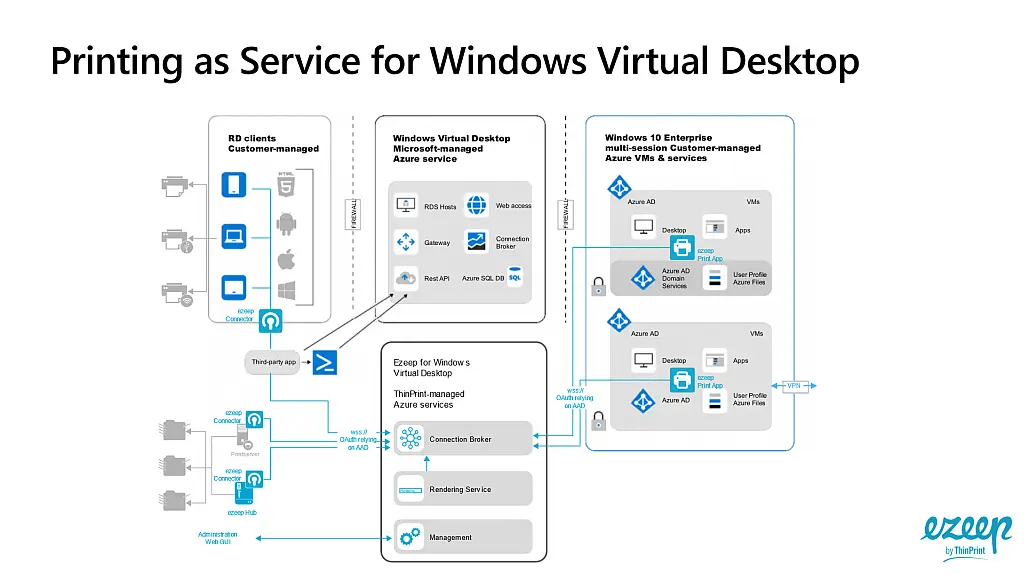
ezeep integrates directly with Azure Virtual Desktop to provide a simplified printing workflow. When a user prints from their virtual desktop, the job is sent to the ezeep cloud, rendered, and then securely delivered to the designated printer. This process eliminates local driver installations and ensures compatibility across a wide range of devices and operating systems.
Proof point: Built on ThinPrint technology, trusted by Fortune 500 organizations, ezeep handles millions of printed pages daily, ensuring reliable performance even in demanding enterprise environments.