By Charles Ian Pritchard on November 25, 2022
Last updated on March 31, 2026

Corporate IT systems face cyberattacks with increasing frequency, impacting businesses and their operations. A 2021 study revealed that 59% of companies with remote workers experienced cyberattacks, with 52% reporting damages. This highlights the urgent need for IT departments to create more secure work environments. Traditional security models, often based on VPNs, are vulnerable because once an attacker gains access, they can access all resources. Implementing a Zero Trust strategy is crucial for enhancing network security, especially with the rise of remote work and ever-evolving threats.
What is a Zero Trust strategy?
A Zero Trust strategy fundamentally changes how organizations approach network security by applying strict verification measures. Instead of trusting anything inside the network by default, Zero Trust requires continuous verification for every user, device, and application attempting to access resources, regardless of their location. This model assumes that breaches are inevitable or have already occurred, thereby minimizing potential damage. This approach differs significantly from traditional perimeter-based security, which once an attacker bypasses the initial defenses, often grants them broad access.
It has gained popularity among government agencies and highly regulated organizations in finance, healthcare, and law. Even US President Biden’s Executive Order 14028 prompts public institutions to create such environments. It’s wise to supplement existing VPN systems with a more modern security concept.
How do you implement Zero Trust?
To implement a Zero Trust strategy, you can use network segmentation, often called Zero Trust segmentation or micro-segmentation. This divides the network into smaller, isolated segments, allowing targeted access to network resources without making the entire network available. For this security concept, user computers and servers must be in separate segments within the Zero Trust environment. This approach limits lateral movement for attackers, reducing the blast radius of potential breaches.
Zero Trust for remote work
In remote work environments, it is vital to strictly separate employees’ local home networks from company applications. This ensures that no administrator is responsible for securing private networks. A combination of VPN and remote desktop access is often recommended. This increasing trend allows users to choose their own devices, such as Chromebooks, while maintaining security.
What about printers in a Zero Trust environment?
Integrating printers into a Zero Trust environment can present several problems. In Zero Trust network segmentation, printers and application computers are often in separate segments, making direct access difficult. Additionally, secure home office policies often prohibit connecting printers directly to home networks or local interfaces, barring them from corporate environments. Access restrictions to local hard drives can also prevent printing directly from web applications without first creating a PDF.
- In Zero Trust network segmentation, printers and application computers are in separate segments, preventing easy access from the application computer.
- Connecting printers to home networks or local interfaces is often prohibited in secure home office workplaces, preventing them from accessing the corporate environment.
- Access restrictions to local hard drives mean it is not possible to print from a web application without first creating a PDF.
How do you securely integrate printers into Zero Trust environments?
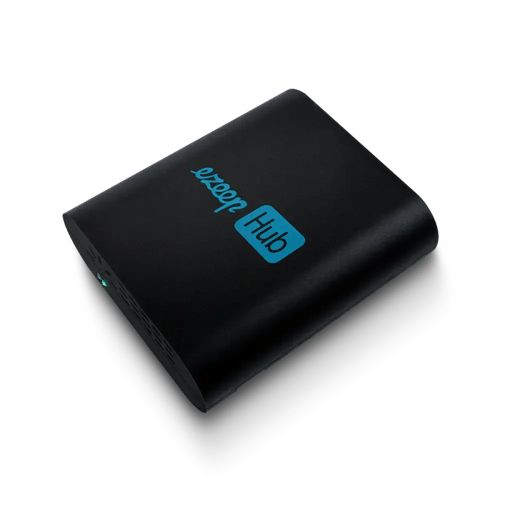
To integrate printers securely into a Zero Trust environment, establish a protected connection between the cloud and the printer. Ensure the printer is not directly addressable from the internet to block other incoming connections. Cloud printing solutions offer connector software or hardware for this. ezeep uses the ezeep Hub, which independently establishes the connection between the cloud and the printer. This makes the Hub the sole point of contact for the printer, securing its integration.
The compact ezeep Hub connects to the same network as the printer. Register it in the ezeep Admin Portal using its Mac address, and it automatically connects the printer to the ezeep Cloud. Users can then access these printers via the ezeep App or an ezeep printer driver.
Local printing from a protected home office
The ezeep Hub suits home offices perfectly due to its small size and low power usage, requiring no maintenance. Its simplicity enables Zero Trust printing without direct access between the PC and printer. IT administrators can send the ezeep Hub directly to home office employees, as it configures via the cloud and only needs to be added to the network. Native printing is also supported when using remote desktop solutions such as Azure Virtual Desktop; simply install an additional client agent after creating an ezeep account in the Azure Marketplace.
Printing from web applications
To allow web applications to print without local file storage, ezeep offers an API that executes print jobs directly from the web application’s backend. Integration through the ezeep.js Javascript module further simplifies its use. For apps, connecting ezeep and Zapier enables automatic printing from numerous applications. Zaps are automated workflows that trigger predefined actions. By integrating ezeep into a Zap, you can automate printing tasks from your apps.
Allow printers for authorized access only
To maintain a secure Zero Trust environment, printers must only be accessible with authorized access. Cloud printing services that require user authorization are highly recommended, especially those with two-factor authentication for enhanced security. These services ensure no direct access to the printer at any time. For example, ezeep provides two-factor authentication via Active Directory or Google.
Connector software or hardware, such as the ezeep Hub, ensure continuous authorization using OAuth 2. The ezeep Hub scans the network independently and allows selection of the desired printer. This means only authorized persons can control the printer, closing a frequently overlooked security gap. Authorized printer use prevents malware spread across the corporate network or infection of employee computers.
Summary
The Zero Trust concept is crucial in today’s digital landscape. Printers often pose a challenge during implementation, but cloud printing services like ezeep provide a solution, enabling secure printer use. Administrators gain significant advantages with ezeep over traditional printing environments, as it offers easier and more resource-efficient management.
With ezeep, you protect printers from attackers and prevent unauthorized access to confidential documents.

Printing in Zero Trust Networks

Azure Virtual Desktop with Zero Trust: Enhanced Security