Build Print Automations in the ezeep Admin Portal
By Charles Ian Pritchard on September 19, 2023
Last updated on April 13, 2026
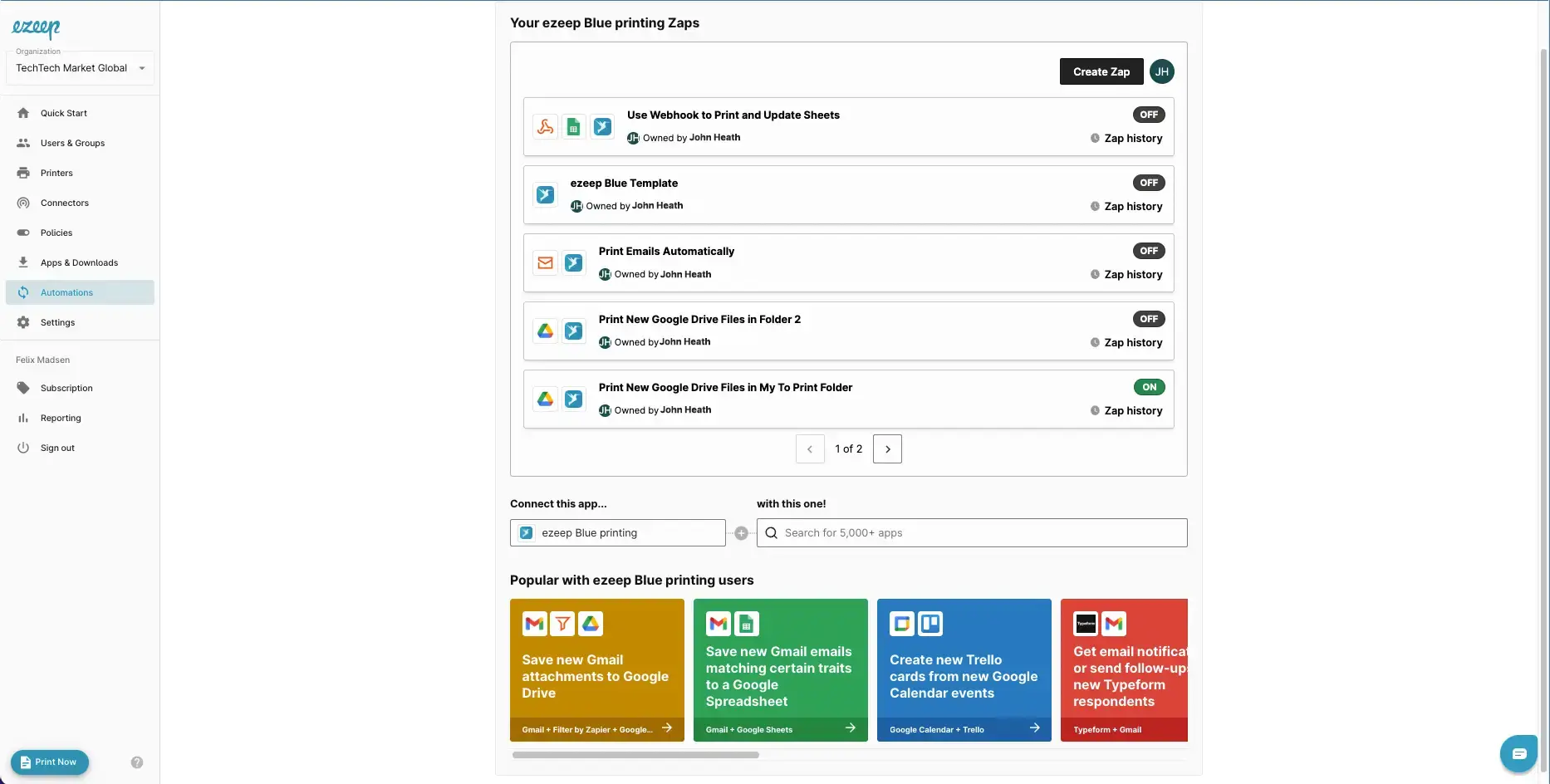
Automate printing in your business workflows simply. The new Automations section in the ezeep Admin Portal supports every IT admin to build print automations without coding, by connecting with Zapier, a popular no-code automation tool. This integration makes print automation accessible and easy to manage for any organization.
Why Use the New Automation Menu?
The new automation menu makes managing your print workflows simpler and more productive.
- Increase Efficiency and Save Time: Creating print automations becomes quick and easy. Admins can quickly build, manage, and deploy workflows that trigger printing with ezeep and Zapier. Studies show significant time savings with automation workflows.
- View Existing Templates for Print Automation: If you need inspiration, the automation section provides pre-configured templates based on common print scenarios that you can try.
- Simplified Workflow: For those already automating printing with Zapier, you can now reduce the time spent switching between tools and view active workflows directly within ezeep.
Why Connect with Zapier?
The combination of ezeep and Zapier makes print automations simple, requiring no coding expertise. IT professionals can begin automating tasks right away, as this functionality is now available with every ezeep plan.
- Simplicity: Zapier's drag-and-drop interface allows users to connect ezeep with thousands of apps, creating automated workflows within minutes.
- Speed: The absence of coding means automation processes can be set up much faster than with traditional API methods.
- Efficiency: IT professionals can focus on more complex, important tasks, while automation handles routine print jobs reliably.
What Are Common Use Cases for Print Automation?
- Automating the printing of emails and attachments helps a catering company more efficiently plan events.
- An accounting firm saves time through automated report printing thanks to ezeep.
- A healthcare company automates prescription printing with Zapier and ezeep, improving work processes and increasing customer satisfaction.
Start Print Automation Today!
ezeep now offers a productive and user-friendly automation feature perfect for the modern IT professional. Built on ThinPrint technology, trusted by Fortune 500 organizations, and handling millions of pages daily, ezeep provides a reliable print management platform.
Already an ezeep user? You should see all the changes in your admin portal already.
New to ezeep? Start using ezeep for free today.
Frequently Asked Questions
What is the new Automations feature in the ezeep Admin Portal?
The new Automations feature allows IT admins to automate printing processes within their business workflows. It integrates with Zapier, a no-code automation tool, making it accessible even without coding knowledge.
How does the new automation menu help IT admins save time?
The new automation menu helps IT admins save time by simplifying the creation, management, and deployment of print workflows. This allows for quick setup of automated printing triggers using ezeep and Zapier.
Can I use print automation without coding experience?
Yes, you can use print automation without coding experience. The ezeep Admin Portal's new Automations section is designed to be accessible to all IT admins, thanks to its integration with Zapier, a no-code automation tool.
Where can I find pre-configured print automation templates?
You can find pre-configured print automation templates within the Automations section of the ezeep Admin Portal. These templates are based on common printing scenarios and can provide inspiration for your own automations.
- March 2026 (3)
- February 2026 (2)
- January 2026 (2)
- December 2025 (2)
- November 2025 (5)
- October 2025 (6)
- September 2025 (1)
- August 2025 (4)
- July 2025 (1)
- June 2025 (3)
- May 2025 (1)
- April 2025 (5)
- March 2025 (6)
- February 2025 (6)
- January 2025 (3)
- December 2024 (5)
- November 2024 (4)
- October 2024 (7)
- September 2024 (2)
- August 2024 (2)
- July 2024 (5)
- May 2024 (4)
- March 2024 (1)
- February 2024 (3)
- January 2024 (1)
- December 2023 (1)
- November 2023 (3)
- October 2023 (3)
- September 2023 (3)
- August 2023 (1)
- July 2023 (3)
- June 2023 (2)
- May 2023 (1)
- April 2023 (5)
- March 2023 (7)
- February 2023 (4)
- January 2023 (2)
- December 2022 (3)
- November 2022 (2)
- October 2022 (5)
- September 2022 (6)
- August 2022 (2)
- July 2022 (4)
- June 2022 (5)
- May 2022 (2)
- April 2022 (4)
- March 2022 (4)
- February 2022 (2)
- January 2022 (1)
- October 2021 (1)
- July 2021 (5)
- June 2021 (4)
- May 2021 (3)
- April 2021 (1)
- March 2021 (4)
- February 2021 (1)
- December 2020 (1)
- November 2020 (1)
- October 2020 (1)
- September 2020 (1)
- June 2020 (1)
- April 2020 (4)
- March 2020 (3)
- February 2020 (3)
- January 2020 (1)
- August 2019 (2)
- May 2019 (1)
- September 2018 (1)
- January 2018 (1)
- May 2017 (1)
- November 2016 (1)
- October 2016 (1)
- May 2016 (1)
- May 2014 (1)
- January 2014 (1)
- October 2013 (1)
- August 2013 (1)
- April 2013 (1)
You May Also Like
These Related Stories
Build Print Automations in the ezeep Admin Portal
Automated Printing with ezeep and Zapier