
By on Jul 31, 2024 12:00:00 PM
ezeep Blue’s New Streamlined Print Assignment Editor
We’re excited to introduce the new streamlined Print Assignment Editor in ezeep Blue, combining all printer and assignment options into one convenient location.
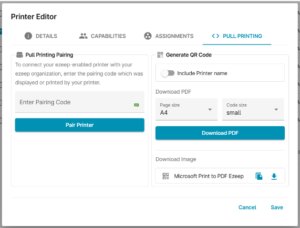
Overview of Features in the New Assignment Editor
- Generate QR Codes: Easily create QR codes for your printers to enable pull printing.
- Optional Pairing: New optional pairing for printer clients where supported.
- Printer Profiles: Manage printer profiles directly in the assignments window. You can now sort between users and groups and assign appropriate profiles seamlessly from this window directly.
- New Printer Sorting: Easily sort and filter your printers via model, location or connector.
Explore the new features today to simplify and optimize your printing operations! For more details, visit our Knowledge Base.
New Chatbot in the ezeep Admin Portal
Additionally, we have launched a new chatbot with a translation function to enhance your support experience.
Share this
Improvements to the ezeep Blue portals for users and admins
![]()
Improvements to the ezeep Blue portals for users and admins
Jun 16, 2021 12:00:00 PM
1
min read
ezeep for Azure becomes ezeep Blue
![]()
ezeep for Azure becomes ezeep Blue
Aug 20, 2020 12:00:00 PM
1
min read
ezeep Blue printing from macOS
![]()
ezeep Blue printing from macOS
Sep 3, 2021 12:00:00 PM
1
min read
No Comments Yet
Let us know what you think