March 2026

March 16

New: Default Paper Format

Admins can define a default paper format at the organization level, which automatically applies to all printers provisioned through the cloud driver pool (API printing, Hub printing, Mac printing, mobile printing), unless explicitly overridden.

November 2025

November 26

New: Wi-Fi-enabled ezeep Hub

The new Wi-Fi-enabled ezeep Hub delivers all the benefits of ezeep’s cloud printing with only a power cable required. Any printer connected via USB or on the same Wi-Fi or LAN becomes instantly cloud-ready — no network cabling needed.

October 2025

October 13

New: Self-Join for Everyone

Onboard users in seconds — no admin work needed!
With ezeep’s new Self-Join options, both permanent and temporary users can join your organization via a simple QR code or link.
Permanent users stay connected; temporary ones are automatically removed after their access ends. Learn more!

June 2025

June 18

ezeep Blue + Cobot Integration Now Live!

We’ve partnered with Cobot to make print management easier for coworking spaces. The combination of both solutions gives members access to a space’s printers and the space operator full control over Cobot printing and printing costs. Cobot with ezeep is set up easily in just a few steps. Learn more!

February 2025

February 26

Printer Driver Pool

11  new printer drivers were added to the ezeep driver pool. Here is a complete list of the newly-added printer drivers »  

New: Claim and Connect

Setting up the ezeep Hub is now easier than ever with Claim and Connect. Simply plug in your Hub, claim it, and let it automatically connect your network printers to ezeep Blue—no manual setup or IT expertise required! Learn more!

December 2024

December 12

ezeep Blue + OfficeRnD Integration Now Live!

ezeep Blue + OfficeRnD Integration Now Live!

We’ve partnered with OfficeRnD to make print management easier for coworking spaces. Sync users with one click and automate print billing seamlessly. Enjoy simplified operations, accurate billing, and complete control over print access and usage. Learn more!

October 2024

October 28

Release Announcement: ezeep Blue App for Windows 2.4.12

The latest version of our Windows print app is now available for download!

What’s New:

  • Customers can now configure a proxy server during installation by applying a custom property.
  • Updates have been made to printer capabilities.

Feel free to check it out!

July 2024

July 31

ezeep Blue’s New Streamlined Print Assignment Editor

ezeep Blue’s New Streamlined Print Assignment Editor 

We’re excited to introduce the new streamlined Print Assignment Editor in ezeep Blue, combining all printer and assignment options into one convenient location.
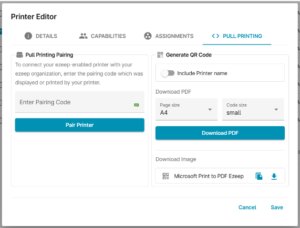
Printer Editor interface of ezeep's platform showing options for Pull Printing Pairing and generating QR codes for printers, with fields to enter pairing codes, select page size, and download PDFs.

Overview of Features in the New Assignment Editor 

  1. Generate QR Codes: Easily create QR codes for your printers to enable pull printing. 
  1. Optional Pairing: New optional pairing for printer clients where supported. 
  1. Printer Profiles: Manage printer profiles directly in the assignments window. You can now sort between users and groups and assign appropriate profiles seamlessly from this window directly. 
  1. New Printer Sorting: Easily sort and filter your printers via model, location or connector. 

Explore the new features today to simplify and optimize your printing operations! For more details, visit our Knowledge Base. 

New Chatbot in the ezeep Admin Portal 

Additionally, we have launched a new chatbot with a translation function to enhance your support experience. 

July 29

New Feature: ezeep Client for Lexmark

Reduce printing costs and wasted resources with ezeep

The new ezeep Client for Lexmark printers enhances security and monitoring capabilities, enabling pull printing and copy tracking directly through the Lexmark device.

Learn more