ezeep is Chrome Enterprise Recommended for printing
By Clara Salomon on February 16, 2021
Last updated on April 13, 2026
ezeep is now officially Chrome Enterprise Recommended. This recognition confirms ezeep as an ideal solution for printing from ChromeOS devices. It ensures businesses can manage printing for employees, students, and guests with efficiency and without the need for servers or complex setups.

Get Managed Cloud Printing Benefits
Many organizations search for a straightforward way to manage printing for their employees, students, and guests. With ezeep and the ezeep Hub, you instantly get the advantages of cloud printing, without the costs of PCs or servers. Printer access is managed via a simple web portal, and users print with ease from any device. This means no drivers or training are required, leading to a significant drop in support calls.
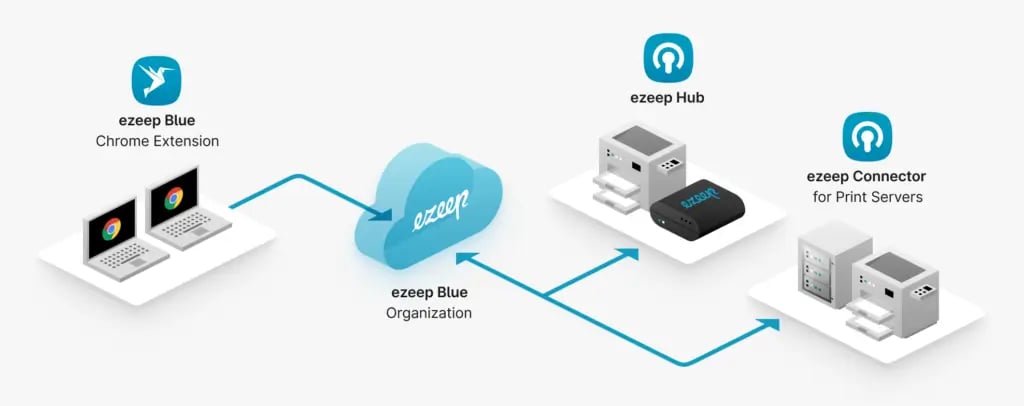
How ezeep Delivers Server-free, Secure Cloud Printing for Google’s Ecosystem
ezeep provides reliable, server-free cloud printing specifically designed for Google's ecosystem, ensuring secure operations and a simplified user experience.
- The ezeep Hub transforms any printer into a cloud printer – eliminating the need for local servers or PCs.
- Users experience consistent Chrome printing without VPNs via the ezeep Chrome extension.
- The admin portal allows for central management – whether for 10 or 10,000 users.
- ezeep is secure. No print jobs are retained, and all communication is TLS encrypted.
- Automated workflows for thousands of apps can be created via Zapier, Make, or our print API.
- All CO2 emissions from print jobs are offset via our cooperation with Justdiggit.
- Confidential print jobs can be released securely at the printer with Pull Printing.
- Works well with hot desking and hybrid work models thanks to AnyPrinter and Print Later.
Frequently Asked Questions
What does Chrome Enterprise Recommended mean for ezeep?
Chrome Enterprise Recommended status means ezeep has been verified by Google to meet high standards for functionality, security, and user experience within the Chrome Enterprise ecosystem. This ensures it integrates well with Chrome OS environments.
Why should I use ezeep for printing with Chrome OS?
ezeep provides a simple way to manage printing for users on Chrome OS devices. It offers cloud-based printing without needing PCs or servers, which helps reduce IT overhead.
How does ezeep simplify printer access for users?
With ezeep, printer access is managed through a web portal, making it straightforward for IT administrators. Users can print easily from any device without needing to install drivers.
Does ezeep eliminate the need for print servers?
Yes, ezeep moves the print infrastructure to the cloud, removing the need for traditional print servers and their associated maintenance costs. This helps reduce infrastructure complexity and cost.
How does ezeep impact IT support for printing?
ezeep helps reduce print-related support calls because it simplifies the printing process and eliminates driver management. This saves time for IT staff and improves user satisfaction.
- March 2026 (3)
- February 2026 (2)
- January 2026 (2)
- December 2025 (2)
- November 2025 (5)
- October 2025 (6)
- September 2025 (1)
- August 2025 (4)
- July 2025 (1)
- June 2025 (3)
- May 2025 (1)
- April 2025 (5)
- March 2025 (6)
- February 2025 (6)
- January 2025 (3)
- December 2024 (5)
- November 2024 (4)
- October 2024 (7)
- September 2024 (2)
- August 2024 (2)
- July 2024 (5)
- May 2024 (4)
- March 2024 (1)
- February 2024 (3)
- January 2024 (1)
- December 2023 (1)
- November 2023 (3)
- October 2023 (3)
- September 2023 (3)
- August 2023 (1)
- July 2023 (3)
- June 2023 (2)
- May 2023 (1)
- April 2023 (5)
- March 2023 (7)
- February 2023 (4)
- January 2023 (2)
- December 2022 (3)
- November 2022 (2)
- October 2022 (5)
- September 2022 (6)
- August 2022 (2)
- July 2022 (4)
- June 2022 (5)
- May 2022 (2)
- April 2022 (4)
- March 2022 (4)
- February 2022 (2)
- January 2022 (1)
- October 2021 (1)
- July 2021 (5)
- June 2021 (4)
- May 2021 (3)
- April 2021 (1)
- March 2021 (4)
- February 2021 (1)
- December 2020 (1)
- November 2020 (1)
- October 2020 (1)
- September 2020 (1)
- June 2020 (1)
- April 2020 (4)
- March 2020 (3)
- February 2020 (3)
- January 2020 (1)
- August 2019 (2)
- May 2019 (1)
- September 2018 (1)
- January 2018 (1)
- May 2017 (1)
- November 2016 (1)
- October 2016 (1)
- May 2016 (1)
- May 2014 (1)
- January 2014 (1)
- October 2013 (1)
- August 2013 (1)
- April 2013 (1)
You May Also Like
These Related Stories

How to Print from Chromebooks: Cloud Printing Explained
Chrome printing is here!