March 2021

March 15

ezeep Blue users now have their own user portal

Feature Update: ezeep Blue users can now log in to ezeep Blue to download their apps and switch between their organizations. Other exciting features will be added soon.

Email verification mandatory for new organizations

Feature Update: ezeep admins now have seven days to verify their email address if they created a new organization and did not use a social login provider.

Email domain reservations available for simplified user onboarding

Feature Update: Organization admins can reserve their email domain. Any user signing in via Google using that email domain will automatically be added to that organization. Sending and accepting invitations is not necessary.
March 11

ezeep Connector for Print Server 2.1.23 improves default setting handling

Maintenance Update ezeep Blue Connector: ezeep Connector for Print Server (v 2.1.23) improves the handling of the default setting changes. With this version, admins can change default settings on printer queues on the print server and users will see these default settings applied to their printers when using the ezeep Print App (Windows). Should the user already have changed default settings on their own, the print server defaults are being ignored.

March 5

Improved print stability

Maintenance Update ezeep Blue backend: This hotfix resolves stability issues when printing by improving the communication pipeline between several microservices.

February 2021

February 25

50 new printer drivers added

Feature Update: We released a batch of 50 new printer drivers.

February 17

24 new printer drivers added

Feature Update: We released a batch of 24 new printer drivers.

February 5

19 new printer drivers added

Feature Update: We released a batch of 19 new printer drivers.

February 3

Ordering and billing update

Maintenance Update ezeep Blue backend: We made improvements to the ordering of services and billing of active users in the backend.

February 1

ezeep Connector for Windows and ezeep Connector for Print Server are using the default browser during the login

Maintenance Update ezeep Blue Connector: We released new versions of the ezeep Connector for Windows (2.1.18) and the ezeep Connector for Print Server (2.1.20). Both are now using the default browser instead of Internet Explorer to have users sign in. The new versions are available for download from the ezeep website.

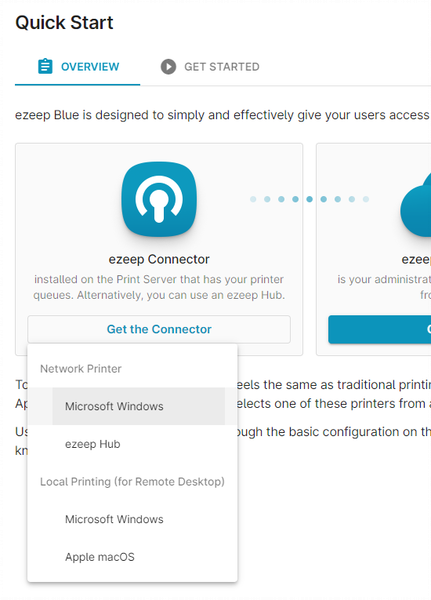
Improved Connector download representation in the Admin portal

Maintenance Update ezeep Blue frontend: This deployment improves the quick start page by making it easier for the ezeep admin to decide which ezeep Connector to download.

Choosing the Connector in the ezeep Admin portal

January 2021

January 20

New version of the ezeep Blue Chrome Extension

Maintenance Update ezeep Blue Print App for Chrome: A new version of the ezeep Blue Chrome Extension is available via the Chrome Extension store (version 2.0.29). It fixes a problem with paper size selection with the Xerox Global PCL6 driver.

Printer driver selection hidden for Windows-based printers

Maintenance Update ezeep Blue backend: Printer driver selection is only necessary when the printer comes from the ezeep Hub appliance. With this deployment, we are hiding in the Admin portal the option to choose a printer driver for printers from Windows-based Connectors.

January 19

Print App for Windows does not use Internet Explorer for login anymore

Maintenance Update ezeep Blue Print Apps: We released ezeep Print App (Windows) version is 2.2.5. With this update, we are not relying on IE for logging in anymore. Unless a user is logging in to ezeep on a remote desktop, the default browser of the user is used.

Improved presentation of US states and Canadian provinces during signup

Maintenance Update ezeep Blue frontend: US states and Canadian provinces are shown correctly in the drop-down menu during the signup process for a new ezeep Blue organization.