Faster ezeep Setup with New Quick Start and Print Now
By Charles Ian Pritchard on March 28, 2022
Last updated on April 13, 2026
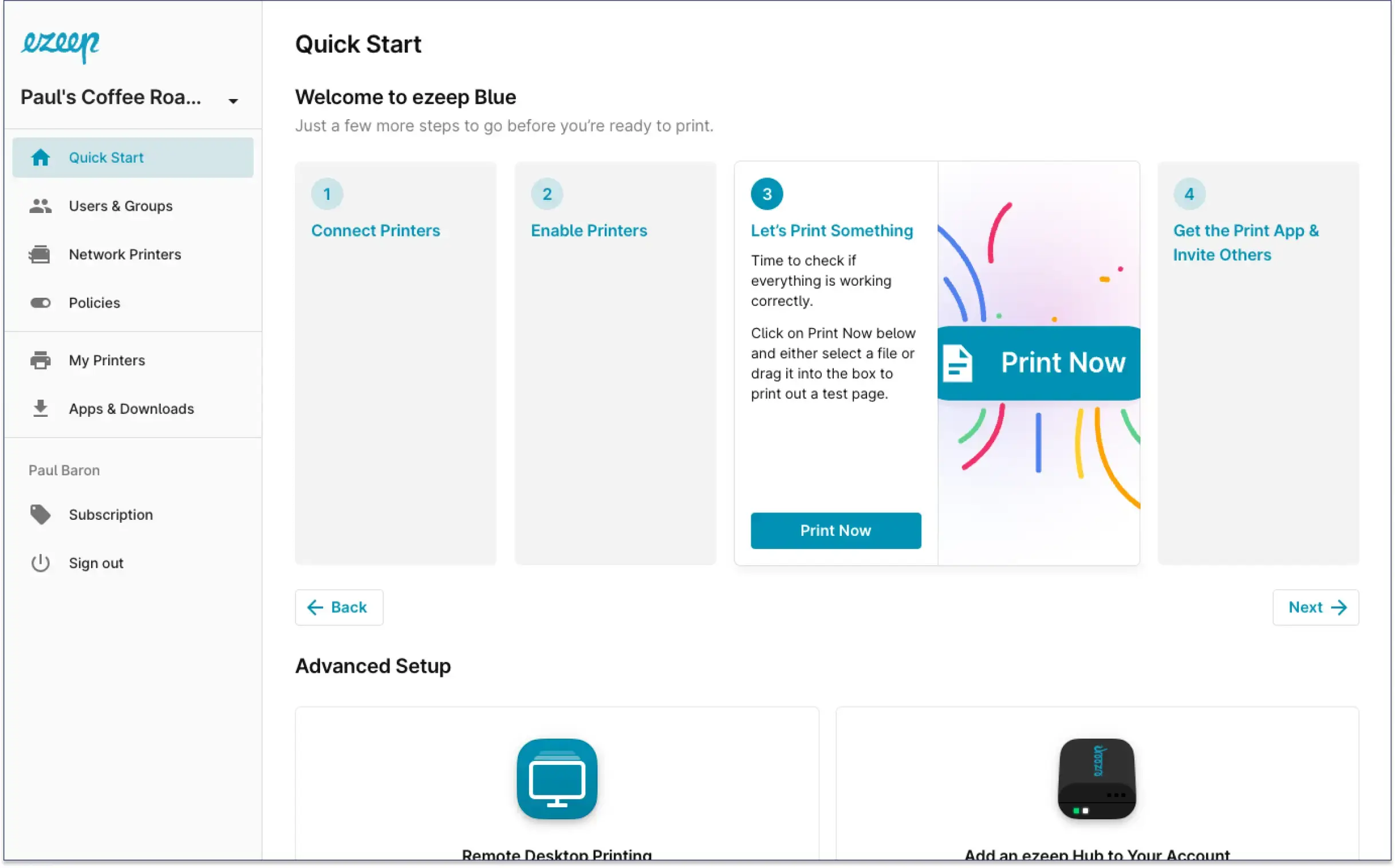
Setting up ezeep and printing your first document is now faster and more intuitive. The redesigned Quick Start guide simplifies the process, helping new users print quickly and invite others with ease. At the same time, the new Print Now feature allows you to print documents directly from your web browser without installing any software.
The Quick Start page now displays 4 simple steps, created to help new account creators print their first page and invite other users more quickly.
New Overview of Advanced Setups
Just below the Quick Start guide, the Advanced Setup section offers more information on advanced configurations for your environment. This section will receive regular updates, so even existing ezeep users will find value in checking it periodically.
Web-Based Printing with Print Now
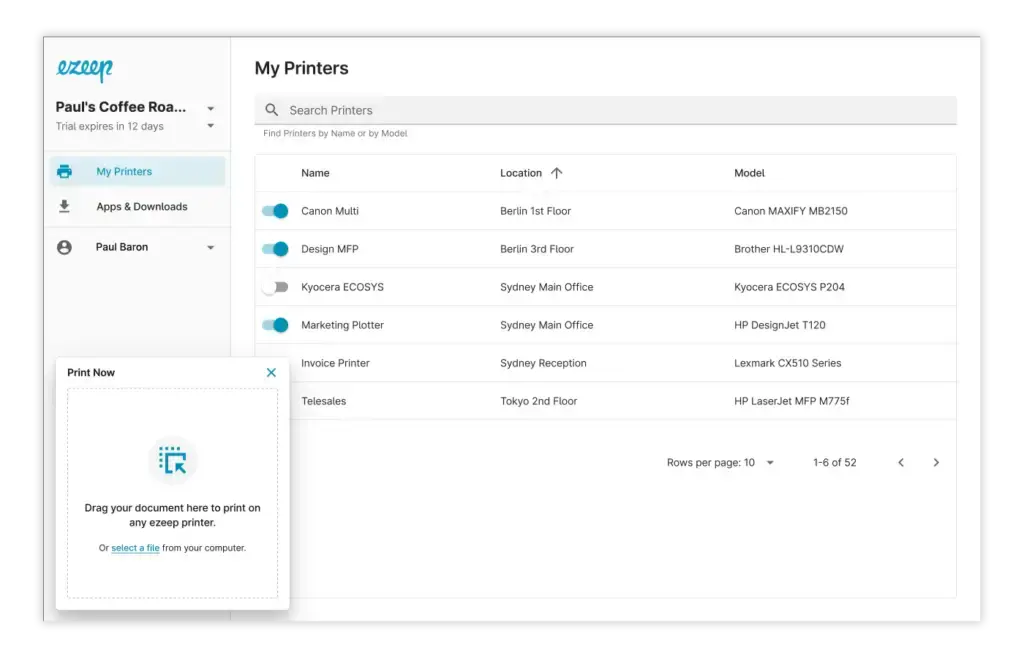
The new Print Now feature lets you print documents directly from the ezeep Web Portal using any web browser. You can drag & drop documents into the Print Now window or select them using your file explorer. A print dialog window then opens, allowing you to choose your printer and any finishing options. No installations are needed, making it a convenient way to print documents straight from your web browser with ezeep.
Now Available to All Users
If you are not yet using ezeep, you can find more information about our free trial on our website. Existing ezeep users can access Print Now and the new Quick Start in the ezeep Admin Portal. For any feedback, contact us at hello@ezeep.com.
Frequently Asked Questions
What is the new Quick Start guide for ezeep?
The new Quick Start guide for ezeep is a redesigned onboarding process that simplifies setting up an ezeep account. It features four steps to help new users quickly print their first page and invite others.
How does Print Now work with ezeep?
Print Now allows users to print directly from their web browser without requiring a local installation. This feature is integrated into the Quick Start guide for a faster and easier initial printing experience.
Where can I find advanced configuration options for ezeep?
Advanced configuration options for ezeep are located in the Advanced Setup section, just below the Quick Start guide. This area provides detailed instructions for more complex ezeep environments.
Who benefits from the updated ezeep Quick Start?
The updated ezeep Quick Start primarily benefits new account creators and IT administrators setting up ezeep for the first time. It streamlines the initial setup process, making it faster to get started and add users.
- March 2026 (3)
- February 2026 (2)
- January 2026 (2)
- December 2025 (2)
- November 2025 (5)
- October 2025 (6)
- September 2025 (1)
- August 2025 (4)
- July 2025 (1)
- June 2025 (3)
- May 2025 (1)
- April 2025 (5)
- March 2025 (6)
- February 2025 (6)
- January 2025 (3)
- December 2024 (5)
- November 2024 (4)
- October 2024 (7)
- September 2024 (2)
- August 2024 (2)
- July 2024 (5)
- May 2024 (4)
- March 2024 (1)
- February 2024 (3)
- January 2024 (1)
- December 2023 (1)
- November 2023 (3)
- October 2023 (3)
- September 2023 (3)
- August 2023 (1)
- July 2023 (3)
- June 2023 (2)
- May 2023 (1)
- April 2023 (5)
- March 2023 (7)
- February 2023 (4)
- January 2023 (2)
- December 2022 (3)
- November 2022 (2)
- October 2022 (5)
- September 2022 (6)
- August 2022 (2)
- July 2022 (4)
- June 2022 (5)
- May 2022 (2)
- April 2022 (4)
- March 2022 (4)
- February 2022 (2)
- January 2022 (1)
- October 2021 (1)
- July 2021 (5)
- June 2021 (4)
- May 2021 (3)
- April 2021 (1)
- March 2021 (4)
- February 2021 (1)
- December 2020 (1)
- November 2020 (1)
- October 2020 (1)
- September 2020 (1)
- June 2020 (1)
- April 2020 (4)
- March 2020 (3)
- February 2020 (3)
- January 2020 (1)
- August 2019 (2)
- May 2019 (1)
- September 2018 (1)
- January 2018 (1)
- May 2017 (1)
- November 2016 (1)
- October 2016 (1)
- May 2016 (1)
- May 2014 (1)
- January 2014 (1)
- October 2013 (1)
- August 2013 (1)
- April 2013 (1)
You May Also Like
These Related Stories

Printing on Surface & Copilot+ PCs: No Drivers Needed

ezeep Summer Release: New Features and Updates